Showing posts with label System Administration. Show all posts

Wednesday, December 16, 2015

How to export all block data from oracle form..

Set profile option:

"FND Export All Block Data" at site, responsibility or user level.

Note:

Setting up this profile option at site level will consume more APPS_TS_TX_MEDIA tablespace


Tuesday, August 12, 2014

Error–Function Not available in this responsibility Change the responsibility or contact system administrator

Error when Diagnostics—> Examine

image

image

This is due to Profile option.

Navigate to the system administrator > Profile > System, and query the profile option name as “Utilities:Diagnostics” and set to “ YES” on site, application etc.. to how ever you want to give the access.

Select “Yes” and save.

image

image

image

Now we can able to check the record.

Saturday, December 28, 2013

Error while Purg the concurrent request - ORA-0001 unique constraint %s.%s

Error:

while run the purg concurrent program
Error while Purg the concurrent request - ORA-0001 unique constraint %s.%s

Fix:

APPLIES TO:
Oracle Concurrent Processing - Version 12.1.3 and later
Information in this document applies to any platform.
 

SYMPTOMS
While running FNDCPPUR, it errors out the following:
APP-FND-01564: ORACLE error 1 in request
Cause: request failed due to ORA-00001: unique constraint (%s.%s) violated


CAUSE
Bug 13703211 - FNDCPPUR APP-FND-01564: ORA-00001 UNIQUE CONSTRAINT (%S.%S) VIOLATED
Issue happens when running FNDCPPUR with parameters MODE = COUNT and VALUE=1
 

SOLUTION
 
Base bug is from RDBMS and was still in progress when writing this note:
Bug 14013076 - LEN ATTRIBUTE OF VARCHAR STRUCTURE IS CORRUPTED IN BATCH FETCH OF ROWS
Workaround:
Two patches below are necessary for the workaround to work:


- Patch 10106197:R12.FND.B
- Patch 12747284:R12.FND.B
 

Then try to run with FNDCPPUR with same parameters, but with COUNT >= 2. Once completed, you should be able to run it as before with no issue. This is a workaround
because the issue may reappear later.

Saturday, December 7, 2013

Oracle E-Business Suite R12 - Layers of Access Control


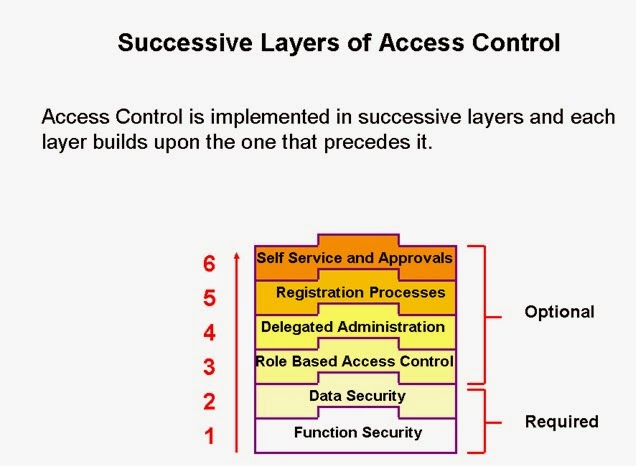
Successive Layers of Access Control
Access Control with Oracle User Management is implemented in successive layers and each layer builds upon the one that precedes it. Organizations can, optionally, uptake the various layers depending on the degree of automation and scalability they wish to build upon the existing Function and Data Security models.
There are six layers of access control. The Core Security layers include:
      Function Security
      Data Security
The next four layers are part of Oracle User Management:
      Role-Based Access Control
      Delegated Administration
      Registration Processes
      Self Service and Approvals


Increasing Flexibility and Scalability
In general, access control with Oracle User Management (OUM) begins with basic system administration tasks, and then progresses to more distributed, local modes of administration, ultimately enabling users to perform some basic, predefined registration tasks on their own. Details of the various levels of access control, and the increasing level of flexibility and automation that they provide are provided later in the lesson. However, the following general guidelines may be considered for now:
System Administrator
Oracle’s Function Security and Data Security mechanisms constitute the base layers of the security system, and contain the traditional system administrative capabilities. Organizations can, optionally, add more layers to the system depending on the degree of flexibility they want.
By themselves, Function Security and Data Security limit the scope of OUM to basic system administration by granting access to specific menus and to the data accessed from within those menus.

Local Administrators
When Role-Based Access Control and Delegated Administration are added to the Data Security and Function Security layers, system administration tasks can be distributed to local administrators who manage a subset of the organization’s users.
End Users
Registration Processes and Self Service and Approvals distribute system administration further by automating some registration tasks so that end users can perform them.


Self Service and Approvals
After the registration processes have been configured as per requirements, individuals can subsequently perform self-service registration tasks, such as obtaining new user accounts or requesting additional access to the system. In addition, organizations can use the Oracle Approvals Management engine to create customized approval routing for these requests.
Example
An organization may enable users to request a particularly sensitive role. However, before the user is granted the role, the organization can specify that two approvers, a manager and a vice president, must provide their approval.

Oracle Application R12 Function Security


Function Security
Function Security restricts user access to individual menus of functions, such as forms, HTML pages, or widgets within an application. It allows you to define a user and assign the user one or more responsibilities, with each responsibility having a menu associated with it. Function Security, by itself, restricts access to various functions, but it does not restrict access to the data that a user can see or the actions that a user can perform on the data.
  This lesson discusses the definition of users, responsibilities, and menus.


Application Security: Overview
In an Oracle Application, the System Administrator manages security by creating user sign-ons and assigning them to one or more responsibilities. Users then have access to all the functionalities associated with that responsibility.
User Security
You authorize a user to sign-on to Oracle Applications by defining an application user with one or more responsibilities assigned.
Responsibility Security
A responsibility is a collection of authorizations that allow access to:
      A specific application or applications
      A Ledger
      A restricted list of windows, functions, and reports
Each user has one or more responsibilities, and several users can share the same responsibility. A System Administrator can assign users any of the standard responsibilities provided with Oracle Applications, or create new custom responsibilities as required.

Self-Service Applications Security
Oracle Self-Service Web Applications use columns, rows, and values in database tables to define the information that users can access. Table columns represent “attributes” assigned to a responsibility. These attributes are defined in the Web Application Dictionary.
Responsibility
A responsibility is a collection of authorizations allowing access to:
      A specific application or applications
      A Ledger
      A restricted list of windows, functions, and reports. These may be associated to the responsibility through menus.
Each user has one or more responsibilities, and several users can share the same responsibility.
A System Administrator can assign users any of the standard responsibilities provided with Oracle Applications or create new custom responsibilities as required.
Users
A user is defined as a human being. Although the concept of a user can be extended to include machines, networks, or intelligent autonomous agents, the definition is limited to a person in this document. You authorize a user to sign-on to Oracle Applications by defining an application user with one or more responsibilities assigned.